Showing posts with label video. Show all posts

Friday, October 2, 2015

Online Student Readiness Tutorials

A new resource to help students prepare for taking online courses has been developed by the CCC Online Education Initiative (OEI). They developed eleven interactive modules covering topics that will help students understand whether or not online courses are right for them and introduce students to the skills and strategies that will help them be successful in online courses. Please assign some or all of these videos for your students to watch at the beginning of each semester. 


Interactive Tutorials

01-Introduction to Online Learning View
02-Getting Tech Ready View
03-Organizing for Online Success View
04-Online Study Skills and Managing Time View
05-Communication Skills for Online Learning View
06-Online Reading Strategies View
07-Career Planning View
08-Educational Planning View
09-Instructional Support View
10-Personal Support View
11-Financial Planning View

Interactive Tools


Thursday, June 11, 2015

YouTube API Changes Causing Issues with YouTube Mashup and Video Everywhere

The following is a bulletin from Blackboard. This issue is unrelated to the recent upgrade and would have happened whether we upgraded or not.


Date Published: Jun 11,2015
Category: Product:Content Management,Extensions; Version:9.1,SaaS
Article No.: 000040643                                                                                                                                                      
Bulletin/Advisory Information: The YouTube Mashup and Video Everywhere tools in the Blackboard Learn software, which allow instructors to integrate videos directly into their lessons and courses from YouTube, is not functioning properly due to Google’s planned retirement of the YouTube Data API (v2).

The result of this is that users are unable to play existing YouTube Mashup links or upload/embed YouTube videos using YouTube Mashup or Video Everywhere. While the uploaded video can still be found on youtube.com, searching for it in the respective course will direct users to https://youtube.com/devicesupport.

It is our top software maintenance priority to restore this functionality, and has been for several months. Our product teams have been working diligently to update our software to work with the YouTube Data API (v3).  We plan on releasing patches as soon as development is completed and patches have passed quality assurance. We estimate that these patches will be available within the next 30 days.

Until software patches are made available, the following workarounds are available.

Workaround #1 - For Existing Links

Access the link by opening it in a new tab within your browser.

Workaround #2 - For Adding New Videos

Instructors who have lost access, and/or are unable to upload and embed YouTube videos using the YouTube Mashup or Video Everywhere tools may go to youtube.com and upload the video(s) via these instructions:
(note: this section modified from Blackboard's original instructions to be clearer)

  • Navigate to https://youtube.com and search for the video you want
  • Copy the URL
  • In Blackboard, select an Assignments/Content area from your menu
  • Create a new item in this content area by selecting Build Content > Item
  • Enter a Name
  • On the content editor toolbar, click the Insert/Edit Embedded Media icon
    (it will bring up a new window)
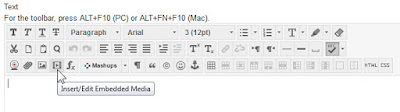
  • Change the Type to iFrame
  • Paste the URL into File/URL
  • Click Insert
  • Submit your new item

Monday, October 28, 2013

Free Video Hosting - 3C Media Solutions

3C Media Solutions is a CCC Chancellor's Office project that provides free video hosting for all California Community College faculty. I wasn't aware of some of the useful ways this can be used until I watched the recording of a webinar they gave a couple of weeks ago through CCC Confer. This service allows you to upload and host your college video content. You then get a link to your video that you can give to your students through email or Blackboard. 

Another interesting feature they offer is that they will host YouTube content, so that when you link to it, it doesn't have links to other videos tempting your students to watch funny cat videos instead of working on your course. 

This webinar also talks about several other ways you can use 3C Media Solutions and CCC Confer to provide video or audio files for your courses. Watch the recorded workshop at http://goo.gl/kvW7Ma.


Saturday, August 17, 2013

Help Your Students Login to Blackboard

Some of your students may have trouble getting logged into Blackboard. You have the ability to check to see what username they should be using and you can change their password if needed. Chris Rodgers, my counterpart at Grossmont College, created a video that shows how to do this that you can find on the Online Success website under "Verifying Usernames & Changing Passwords."


Thursday, August 8, 2013

Introduction Video: Why Your Online Course Needs One

I just read an excellent article on why you should create an introduction video for your online course that I wanted to share that with you. You can read it at http://facultyecommons.org/introduction-video/.

The article includes links to a few tools to help make these videos, but all you really need is a webcam. You can watch an introduction video created by our new Spanish instructor for Cuyamaca College's first online Spanish course at http://youtu.be/wCCW33mO32o. Donna Marques recorded this video using her laptop webcam and the new "Record from  Webcam" tool that is now included in every content editor in Blackboard.


You can edit YouTube's automatically generated captions by following the instructions at https://support.google.com/youtube/answer/2734705.


Friday, February 15, 2013

Syllabus Builder Tool

George Joeckel from Utah State University developed an easy to use interactive tool that any instructor can use to create a course syllabus. This free tool will walk you step by step through the process of creating your syllabus including doing some of the calculations for the grading scale and offering up action verbs to use for learning objectives.

The video at http://youtu.be/K_M1Ii92OY8 shows how to use this tool.


You can access the tool at https://elearn.usu.edu/OAR/PDF_Syllabus_Builder_v1_beta.pdf


Friday, November 16, 2012

Creative Commons Licenses

Regent University periodically publishes a video magazine for educators. This month's issue is all about Creative Commons licenses. If you're interested, take a look at http://www.regent.edu/admin/ctl/onlinetraining/centerpoint/.


Thursday, October 11, 2012

Online Student Bill of Rights Video


Quality Matters created this well-done video.
Watch it at http://youtu.be/2mDbSvqBvR8?t=48s

At Cuyamaca College we are committed to quality!


Tuesday, October 9, 2012

Online Learning in the Social Era Video

Michelle Pacansky-Brock traces the possibilities the social era holds for transforming online learning in this short video. Watch it at http://youtu.be/qh2HskDtpK8 or view the embedded version below.

Thursday, September 27, 2012

3 Things You Might Not Know About YouTube

Free CCC Confer Webinar
Thursday, October 11th
Noon - 1:00 PDT
Presenter: Donna Eyestone

Did you know you can:
  • Record and edit your YouTube videos from your web browser
  • Easily add and search captions
  • Curate your own playlist, even adding your own intros to other people's YouTube videos?
All you need is a webcam and a YouTube account -- no software, no trials, no downloads so you and your students can easily create videos.

Learn how to:
  • Write a script
  • Get a good camera angle
  • Record without looking like you're reading
  • Edit out the beginnings and ends of clips


Monday, August 20, 2012

Playing a YouTube Video in Chrome

There is a problem that can occur when trying to play a YouTube video in Blackboard while using the Chrome browser. The instructions at http://www.gcccd.edu/online/documents/BB-Chrome-YouTube.pdf explain how to get these videos to play. Please pass this information on to your students if you have YouTube videos embedded in your Blackboard courses.

Monday, March 19, 2012

Videos to help you rethink education, learning, & school

Garr Reynolds, the author of Presentation Zen has pulled together a collection of thought provoking videos in his blog post at:
http://www.presentationzen.com/presentationzen/2012/03/rethinking-education-learning-the-role-of-school.html


Wednesday, March 14, 2012

Got a great lesson?

"TED-Ed's mission is to capture and amplify the voices of great educators around the world. We do this by pairing extraordinary educators with talented animators to produce a new library of curiosity-igniting videos. You can nominate a teacher, nominate an animator or suggest a lesson here: http://education.ted.com."

Check out the TED-Ed YouTube channel to watch a video that explains what this is all about as well as how you can share your teaching skills with a global audience. While you're there, check out the videos that have been developed so far. There might be something you can use for your classes.

Tuesday, November 8, 2011

Coach's Eye iPhone App


TechSmith has come out with an app for the iPhone that turns you into the ultimate coach. It allows you to:
  • record and review video right on your iPhone
  • focus on the details in the video by slowing it down, drawing on it, adding audio commentary
  • easily share your modified video via text message, email, or YouTube
I can see this being used in education for more than sports coaching. It would be useful in many disciplines such as speech, chemistry, and geography. Find out more at http://www.coachseye.com/.

Saturday, September 3, 2011

The Flipped Classroom

A new method of teaching is turning the traditional classroom on its head. What’s a flipped classroom — and why now?  See a full sized version of this infographic at http://www.knewton.com/flipped-classroom/.

  The Flipped Classroom
Created by Knewton and Column Five Media

Wednesday, August 31, 2011

Search for Closed Captioned Videos

You can find videos that are closed captioned by using the Google Advanced Search page. Captions make videos accessible to those who are hard of hearing. Captions also help students whose native language isn't English, since they may find it easier to understand written English than spoken English. Videos used in online courses that are required to pass the course must be captioned. Google has made it easier to find captioned videos using Advanced Search.

To access this, just begin your search as you normally would at google.com.

On the results page, click Videos.

Next click "Advanced Search"


On the Advanced Search page, you can select to show only videos that are closed captioned, have the duration you're looking for,  and a few other options.


Monday, February 21, 2011

How To Create Camtasia Videos

Ryan Eash from TechSmith created a very detailed video that covers the process he uses to create videos using Camtasia. The video can be found at http://www.screencast.com/t/0xQgD2IMe4D3. This is one of the most informative videos I've seen on this process and it is well worth the 30 minutes to watch it.

Thursday, February 10, 2011

Innovation at Your Fingertips!

"Innovation at Your Fingertips" is the slogan for iStream. iStream is the League of Innovation's "web-based, multimedia portal where faculty, staff, administration, and students find quick solutions for research and reference needs using the latest web 2.0 technology."

"iStream provides videos, articles, publications, and learning programs, along with the best of the League’s conferences, services, partnerships, and collaborative community. Through iStream, you can find everything from professional development modules and best practices, to model programs and leadership tools."

The Grossmont-Cuyamaca Community College District subscribes to this service, so all you or your students have to do is to set up an account to view this wealth of material.

To set up an account:
  • Go to www.league.org/istream
  • Click on “Create Your iStream Account”
  • In the next window, select your college from the dropdown menu
  • Enter your first and last name, and your institutional email address
  • Click “Submit”

Monday, January 31, 2011

Video For Your Courses

The Cuyamaca College library subscribes to a database of academic video clips on a wide variety of subjects that you can incorporate into your on-campus and online classes to enhance learning.  This database is called Intelecom and the library put together a web page about how to use it.

This morning, in response to a question from a faculty member, I created a short video that shows how to use Intelecom Videos in Blackboard that I hope you find useful.

Thursday, December 2, 2010

Prezi - The Coolest Presentation Tool

According to Robin Wauters blog post, "Prezi is the coolest online presentation tool I've ever seen."  I think many of you will agree with Robin after you see this tool in action.  If you're tired of PowerPoint and looking for new ways to present material, give Prezi a try.

If you decide to sign up, be sure to use the educational license page to get a free upgrade to the Enjoy version, or reduced price of $59/year on the Pro version (a $100/year savings).

Just keep in mind that since Prezi creates Flash files that are not accessible, these should be used in the classroom only.