- Annette Vee provides good information on using blogs for teaching at http://www.annettevee.com/blogstoteach/.
- Lanny Arvan has written an excellent article for Inside Higher Ed called "Teaching With Blogs" that you might find interesting.
- Joe Sanchez shares his experiences using blogs in his class at http://www.educause.edu/blog/joesanchez/TeachingwithBlogs/166276
- A slide presentation on 11 Advantages of Using a Blog for Teaching
- Rubrics to Evaluate Classroom Blogging
Information about teaching online, Canvas, instructional technology, and cool tools to help teachers.
Tuesday, July 27, 2010
Teaching with Blogs
Now that Blackboard has the capability to add blogs and journals to your courses, you may be wondering how you might use them to enhance student learning. Here are some resources for you to explore to find out more about using blogs for teaching and learning.
Bb Server Maintenance
A Blackboard server upgrade is scheduled to start on Wednesday, August 11th at 3:30am PDT. It should complete on or before 6:30pm PDT the same day. Blackboard will not be available during that time. Bb 9.0 SP4 (Service Pack 4) will be installed at this time. This upgrade will fix a few bugs we have been experiencing over the summer, but will not change or add functionality to Bb.
Tuesday, July 20, 2010
Avatars Now Available in Bb 9
An avatar is a picture or image that represents you. Avatars can be used to personalize the Blackboard experience and will appear by your name in certain areas of your courses such as journals and blogs. Both faculty and students can upload avatars.
Instructions on how to use avatars can be found at:
http://www.gcccd.edu/online/tutorials/bb/avatars.pdf
Instructions on how to use avatars can be found at:
http://www.gcccd.edu/online/tutorials/bb/avatars.pdf
Wednesday, July 7, 2010
Blackboard Acquires Elluminate & Wimba
This news came today in a letter to Blackboard clients. Elluminate is web conferencing software that is available for faculty to use free right now through CCCConfer. If you've ever taken a webinar through @ONE (which I highly recommend), then you've used Elluminate. Look for these workshops during Professional Development week on Intelligent Integration: Elluminate Bridge for Blackboard and CCC Confer Training for Online Conferencing for more information on how you can use this tool to enhance your teaching..
Wimba "brings students and teachers together with a combination of interactive technologies such as voice, video, podcasting, instant messaging, application sharing, polling, and whiteboarding."
This acquisition will form a new Blackboard Platform called Blackboard Collaborate.
Wimba "brings students and teachers together with a combination of interactive technologies such as voice, video, podcasting, instant messaging, application sharing, polling, and whiteboarding."
This acquisition will form a new Blackboard Platform called Blackboard Collaborate.
Labels:
Blackboard,
Online Courses,
tools,
video
Thursday, July 1, 2010
@ONE Online Teaching Certification Program
@One is offering a new Online Teaching Certification Program that will help you excel in the digital age. It’s extremely affordable, comprehensive and easy to fit within your busy schedule. Plus it’s designed with your instructional needs in mind, so you’ll receive usable tips every step of the way from the highest rated instructors in online education. You’ll increase your student success and retention rates, better use your existing course management tools and learn to leverage new media to inspire your students to excel.
For more information about the program visit www.onefortraining.org/certification.
Thursday, June 17, 2010
Bb 9 Important Information!
Please Report Blackboard Slowness/Timeouts
If you experience Blackboard running slowly, crashing, or timing out, could you please send me an email immediately with the following information:
Check the End Date for Tests
There was a serious problem with dates for tests, and Blackboard ran a script to fix that problem. This fix may impact your courses. If you previously set begin dates for your tests, please double check to make sure the end dates are the dates you want. The script may have reset the end date to a date 30 days after the start date.
Copy Settings when Copying a Course
Copying a course to a new course without copying course settings can create a situation where the new course does not have any settings for one or more course tools. If a course that is copied without settings has one of the checkboxes selected in "My Courses" (using the gear icon) to show Announcements or Tasks, the system will fail while trying to determine whether this tool is even enabled in that course, and any courses later in the list will fail to display in My Courses. This problem may also result in a red error message in the My Tasks module that says: Error reading 'showCourse' on type blackboard.webapps.portal.bbtasks.BbTasksHelper$CourseTasksHelper.
Blackboard has run a script to clear up the current instances of this issue. This fix will not be permanent, but should clear up any current lack of settings. A workaround you can apply is visiting each tool enabled in the course after copying it. A full fix for this issue will be available in a later version of Blackboard.
To prevent this from happening, it is important that Settings is checked every time you use Course Copy, so please keep this in mind when you prepare for your Fall classes.
Course Entry Point
Make sure you set your Course Entry Point (Control Panel > Customization > Style) to Announcements, a content area, or a module page. If you set your Course Entry Point to either My Grades or an External Link, you will not be able to access your course.
If you experience Blackboard running slowly, crashing, or timing out, could you please send me an email immediately with the following information:
- Date and Time you experienced this
- What you were doing in Blackboard at the time
- What you experienced (i.e. slow, crash) with as much detail as you can including error messages
- What internet provider were you using (i.e. Cox cable, AT&T DSL, or on campus)
There was a serious problem with dates for tests, and Blackboard ran a script to fix that problem. This fix may impact your courses. If you previously set begin dates for your tests, please double check to make sure the end dates are the dates you want. The script may have reset the end date to a date 30 days after the start date.
Copy Settings when Copying a Course
Copying a course to a new course without copying course settings can create a situation where the new course does not have any settings for one or more course tools. If a course that is copied without settings has one of the checkboxes selected in "My Courses" (using the gear icon) to show Announcements or Tasks, the system will fail while trying to determine whether this tool is even enabled in that course, and any courses later in the list will fail to display in My Courses. This problem may also result in a red error message in the My Tasks module that says: Error reading 'showCourse' on type blackboard.webapps.portal.bbtasks.BbTasksHelper$CourseTasksHelper.
Blackboard has run a script to clear up the current instances of this issue. This fix will not be permanent, but should clear up any current lack of settings. A workaround you can apply is visiting each tool enabled in the course after copying it. A full fix for this issue will be available in a later version of Blackboard.
To prevent this from happening, it is important that Settings is checked every time you use Course Copy, so please keep this in mind when you prepare for your Fall classes.
Course Entry Point
Make sure you set your Course Entry Point (Control Panel > Customization > Style) to Announcements, a content area, or a module page. If you set your Course Entry Point to either My Grades or an External Link, you will not be able to access your course.
Thursday, June 10, 2010
Students are not receiving Announcement emails from Blackboard
When you post an announcement to your courses, normally Blackboard sends that announcement to your students through email. Right now, some announcement emails are not being sent by Blackboard. To make sure your announcements are reaching your students, please use the Send Email tool (Control Panel > Course Tools > Send Email) to send your students the information they need to begin your courses.
This issue has been reported to Blackboard and has been given the highest priority. I am hopeful for a fast fix for this, but wanted to give you an alternative to use until it is fixed.
Tuesday, June 8, 2010
A Few Tips For Bb 9
As anticipated, there are a few things that need to be adjusted for Blackboard 9. I'll address a few of them here.
1. SafeAssign needs to be enabled
This only pertains to course containers that were created for the summer semester. Fall semester containers should be set correctly for this. In order to use SafeAssign you need to change these settings.
1. SafeAssign needs to be enabled
This only pertains to course containers that were created for the summer semester. Fall semester containers should be set correctly for this. In order to use SafeAssign you need to change these settings.
- Control Panel > Customization > Tool Availability
- Scroll down and make sure that both SafeAssign and SafeAssignment are checked, then click Submit
2. My Courses list
Some people have had problems getting all their courses to show in the My Courses section on the Welcome page. If you are experiencing this problem, follow these steps to get your courses to display.
- Click on the gear icon in the upper right corner of the My Courses section
- Uncheck every check that appears in the Display Announcements column
- To have a course show, check the Display Course Name and Display Course ID columns
- To hide a course from My Courses, uncheck everything in the row for that course
- Click Submit when done
3. Always choose a Display Until date if you choose a Display After date
For an item, test, discussion board, or just about anywhere you can choose a date range, make sure you choose both a Display Until date and a Display After date. An error can occur if both dates are not defined.
4. Use dates for announcements
When you create an announcement, you have the option to set the announcement duration to Permanent or Date Restricted. If you choose Permanent, your announcement will not show up in the My Announcements section on the Welcome page. To make sure it shows up there, you need to choose Date Restricted and assign both a Display After and Display Until date.
Sunday, June 6, 2010
Blackboard 9 Resources
Now that we're up and running with Blackboard 9, I'd like to point you to a few resources to help you find the information you need to use it. Chris Rodgers and I are combining our efforts and creating resources that will help both colleges. You can find a page on the GCCCD Online site that has all the Bb 9 tutorials we've rewritten at http://www.gcccd.edu/online/fac/. More will be coming soon.
The section containers that were created for the summer semester have incorrect instructions on how to make your containers available. The Bb 9 way of making a course available can be found at http://www.gcccd.edu/online/tutorials/bb/course-availability-9.pdf. In short, the steps are:
Control Panel > Customization > Properties > Set Availability (yes or no) > Submit.
Other resources for Blackboard 9 are the videos that Blackboard has created which you can find at http://ondemand.blackboard.com/r9/index.htm. They're really done quite well.
And as always, please contact me if you have any questions!
The section containers that were created for the summer semester have incorrect instructions on how to make your containers available. The Bb 9 way of making a course available can be found at http://www.gcccd.edu/online/tutorials/bb/course-availability-9.pdf. In short, the steps are:
Control Panel > Customization > Properties > Set Availability (yes or no) > Submit.
Other resources for Blackboard 9 are the videos that Blackboard has created which you can find at http://ondemand.blackboard.com/r9/index.htm. They're really done quite well.
And as always, please contact me if you have any questions!
Friday, May 28, 2010
End of Semester To Do List for Blackboard
It's the end of the semester and for those of you using Blackboard there are just a couple of things you still need to do to finish out the semester. You need to make your course unavailable to students and it's a good idea to create a backup of your course so all the student work and your work is archived to your hard drive.
- To make your course unavailable:
Control Panel > Settings > Course Availability > Make Course Available: No
- To make a backup of your course:
web version of instructions
pdf version of instructions
Be sure to do all this and turn in your grades before the system goes down for the upgrade to Blackboard 9 on June 3rd.
Tuesday, May 25, 2010
Opportunities to Enhance Your Skills This Summer
Here are some opportunities to enhance your online teaching skills this summer.
@ONE Online Classes
These courses will count towards certification to teach online at Cuyamaca College.
- Creating Accessible Online Courses
Mon, 07/05/2010 - Fri, 07/30/2010
- Introduction to Online Teaching and Learning (2nd Session)
Mon, 08/02/2010 - Fri, 08/27/2010
- Introduction to Teaching with Blackboard 9
Mon, 07/12/2010 - Fri, 08/06/2010
Merrit College Online Educator Program
These classes are taught totally online and are appropriate for anyone whether they are new to online instruction or want to learn more about specific areas of online teaching. More information about these EDT classes is found at http://alexandereducation.org/EDT/?p=110.
- EDT 1 Introduction to Online Teacher
- EDT 3 Introduction to Hybrid Teaching
- EDT 6 Providing Support to Online Learners
Online Teaching Conference 2010
The Online Teaching Conference 2010 will be held June 16, 17, 18 at San Diego City College in San Diego, CA. This conference can be attended online from wherever you may be this summer, and online attendance is free! See http://www.otc10.org/ for more information.
Thursday, May 20, 2010
Bb 9 - Upgrade Schedule
Here is the sequence of events that will take place to complete the upgrade to Blackboard version 9.
- Friday, May 28 - Snapshot stops running. This means that information regarding class enrollments, email address changes, etc. will stop being transferred from WebAdvisor to Blackboard.
- Wednesday, June 2 - Grade deadline.
- Thursday, June 3 at 10 pm until Saturday, June 5 at 5am - The upgrade will be installed. Blackboard will not be available during this time. (time approximate)
- Saturday, June 5 - if all has gone well, faculty can begin working on Summer semester containers in Blackboard.
- Monday, June 7 - templates will be copied from the test server to the live server to prepare for the creation of Fall semester containers and other settings will be adjusted as needed.
- Tuesday, June 8 at approximately 6 am - Snapshot begins running again. Fall semester containers are created and enrollments for Summer semester are updated.
- Monday, June 14 - Summer Semester begins and everything runs smoothly!
Thursday, May 13, 2010
Bb 9 - You Need To Add Tools To Your Course Menu
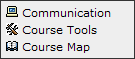
In Blackboard 8, there are links below your menu that allow students to access Communication and Course Tools such as Email, Messages, Discussion Board, Calendar, My Grades, and the User Manual.In Blackboard 9, these links are no longer available to students, so you will need to give your students access to these tools by adding a menu item for them. Bb 9 has a "Tools Area" tool that you can add to your menu that contains all the tools that you want to make available to your students.
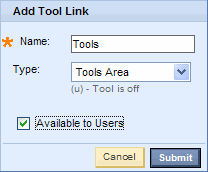
Here is how to add this "Tools Area" to your menu in Bb 9:
- Make sure Edit Mode is On
- Hover over the + sign in the menu
- Click on Create Tool Link

- Name: Tools (it will help our students if everyone names this the same thing!)
- Type: Tools Area
- Check Available to Users
- Submit
When you click on the Tools link you just created, you will see the Tools area. This new tool makes it very easy for you to control which tools you want your students see. Just click the Hide Link or Show Link buttons next to each tool to customize this page to meet your needs.
Tuesday, May 4, 2010
2009 Distance Education Survey Results
With six years of accumulated data and tracking of pertinent developments, the annual "Trends in eLearning" survey has emerged as a recognized tool that both confirms trends and points to best practices for Distance Education programs.
Some key results from the survey:
- The completion rate gap between distance learning and face-to-face student has significantly narrowed. Completion rates jumped to a reported 72 percent, just below the 76 rate for face-to-face classes.
- Campuses reported an 22 percent increase for distance learning enrollments, while Sloan-C reports increases in overall campus enrollments averaged less than two percent.
- Growth in the use of blended/hybrid and Web-assisted/Web-enhanced/Web-facilitated classes continues.
Bb 9 - Problems with Test Banks from Publishers
Some colleges already using Blackboard 9 have reported issues with some test banks provided by publishers. Please be aware that you may need to contact your publisher to get the most recent test bank software from them.
Known to work correctly with Bb 9:
If you are copying a course that is already using a test bank in Bb 8, it should work okay in Bb 9.
- Diploma version 6.67
- ExamView version 6.2.x
- TestGen 7.4.4
If you are copying a course that is already using a test bank in Bb 8, it should work okay in Bb 9.
Thursday, April 29, 2010
Bb 9 - Blogs and Journals: FAQ's
Last week I posted links to some videos about how to use blogs and journals and that post raised a few questions that are answered here.
Blogs and Journals provide students and instructors with a social learning tool for expressing their thoughts and reflecting on their learning, either privately (with the instructor) or publicly (with others in the course). These tools empower all course users to create and share ideas, while instructors maintain the ability to edit or remove any inappropriate material.
What is the difference between Journals, Blogs, and Discussion Board forums?
Where Do Blogs and Journals Appear?
Can I make Blogs and Journals Public?
Blogs and Journals provide students and instructors with a social learning tool for expressing their thoughts and reflecting on their learning, either privately (with the instructor) or publicly (with others in the course). These tools empower all course users to create and share ideas, while instructors maintain the ability to edit or remove any inappropriate material.
What is the difference between Journals, Blogs, and Discussion Board forums?
- A journal is like a private diary that the student shares with the instructor.
- A blog is like an open diary that everyone in the class can read and comment on.
- A discussion board forum is like an open meeting where anyone can participate equally.
An example of when to use an individual blog instead of a discussion board would be when you want students to post an essay and have other students comment on it. Using a blog for this assignment would keep the essay intact with all the comments attached to it. In a discussion board forum this type of assignment often spawns other threads and it can be confusing where the original essay is located and difficult to find all the comments it generated.
Where Do Blogs and Journals Appear?
Instructors can find them in the Control Panel under Course Tools. Instructors can provide access to students through links in content areas, blog or journal links on the course menu, or a Tools Area link on the course menu.
Can I make Blogs and Journals Public?
No. The privacy of students' course work needs to be respected. Opening these tools to the outside world may violate privacy laws.
Wednesday, April 21, 2010
Bb 9 - Blogs and Journals
New tools available in Blackboard 9 are Blogs and Journals. Here are some videos that show you how to add them to your class and post to them. You can provide links to these videos within your course for your students to view to explain to them how to use these tools. These videos aren't perfect for student use because some instructor view stuff shows on the pages, but I think it's better than having to create instructions yourself. See my recommendations below for alternative ways of providing links to these tools within your course.
- Creating a Blog
(I recommend creating a link to a specific blog using Collaborate > Create Blog Link from within your content area instead of the process shown in this video) - Creating and Editing Blog Entries (for students)
- Commenting on a Blog Entry (for students)
- Creating a Journal
(I recommend creating a link to a specific journal using Collaborate > Create Journals from within your content area instead of the process shown in this video) - Creating Journal Entries (for students)
Safeguard your Passwords
Last week there was a report of a 9-year-old student that hacked into Blackboard. How did this 9-year-old do it? Very simply, he obtained a teacher's password.
If a 9-year-old can do this, so can your students. Please make sure you're using a password that students cannot figure out, such as a birthdate. To change your password in Blackboard, on the welcome page, click on Personal Information, then Change Password.
Friday, April 16, 2010
Bb 9 - New Group Sets and Group Assignments
A new feature in Blackboard 9 allows you to create groups in sets. For example, you want to split your class into 5 groups to do a project. The old way of doing this would be to create 5 groups, with all those clicks for each group. Now you can just create one Group Set and all 5 groups are created at once. See this video to learn more: http://ondemand.blackboard.com/r9/movies/Bb9_Groups_Create_Group_Sets.htm
Blackboard didn't stop there! They also created Group Assignments. This tool allows one student in the group to turn in the assignment and you grade it once, and every member of the group receives that grade. This grade can be overridden for individuals as needed. Here's another short video that shows how:
http://ondemand.blackboard.com/r9/movies/Bb9_Assignments_Deploying_Group_Assignments.htm
Blackboard didn't stop there! They also created Group Assignments. This tool allows one student in the group to turn in the assignment and you grade it once, and every member of the group receives that grade. This grade can be overridden for individuals as needed. Here's another short video that shows how:
http://ondemand.blackboard.com/r9/movies/Bb9_Assignments_Deploying_Group_Assignments.htm
Monday, April 5, 2010
Bb 9 Workshops Start this Week
I will begin offering Introduction to Blackboard 9 workshops starting this week.
These workshops will be limited to 15 participants. Please sign up to reserve your place at http://www.cuyamaca.edu/tlc/workshops/bb9-signup.asp.
* The Saturday workshop is tentative at this time.
These workshops will be limited to 15 participants. Please sign up to reserve your place at http://www.cuyamaca.edu/tlc/workshops/bb9-signup.asp.
| Date | Day | Time | Room |
|---|---|---|---|
| 4/9 | Friday | 1 - 3 pm | E-206 |
| 4/14 | Wednesday | 9 - 11 am | E-206 |
| 4/16 | Friday | 9 - 11 am | E-206 |
| 4/20 | Tuesday | 9 - 11 am | E-210 |
| 4/22 | Thursday | 1 - 3 pm | E-206 |
| 4/23 | Friday | 9 - 11 am | E-206 |
| 4/30 | Friday | 9 - 11 am | E-206 |
| 5/1 | Saturday * | 10 - Noon | E-206 |
* The Saturday workshop is tentative at this time.
Subscribe to:
Posts (Atom)